
Networking Fundamentals
Understanding networking is the foundation of system design. Every distributed system communicates across networks using standardized protocols and architectures.
1. What Happens When You Type a URL?
This is one of the most common core questions in system design interviews.
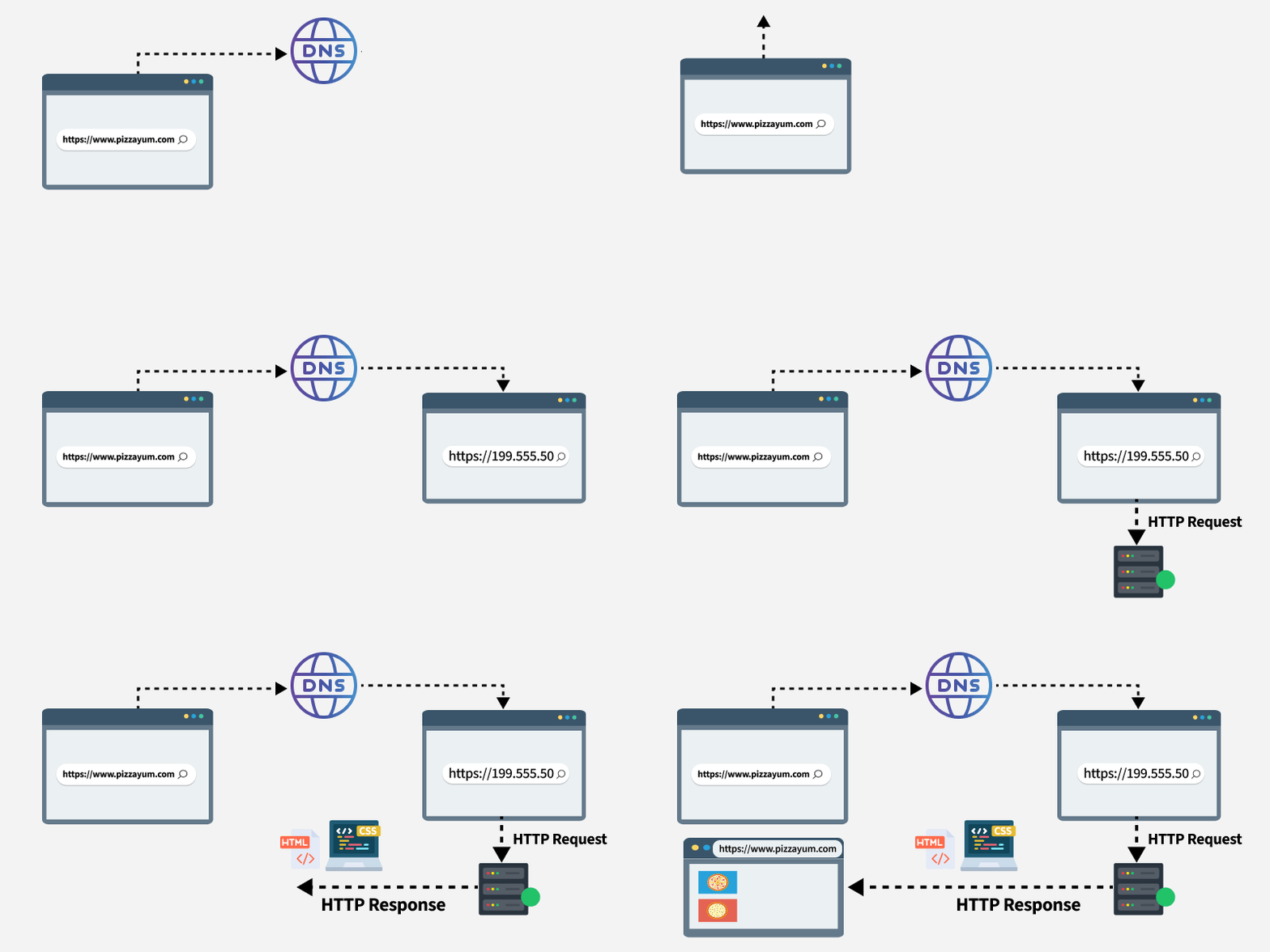
Step-by-Step Breakdown:
- Browser parses the URL: Extracts protocol (
https), domain (google.com), and path (/search). - DNS Lookup: Resolves
google.comto an IP address (e.g.,142.250.183.14) via Browser Cache → OS Cache → Router → ISP Resolver → Root/TLD/Authoritative DNS. - TCP Connection Establishment: Three-way handshake (
SYN→SYN-ACK→ACK) between client and server IP. - TLS Handshake: If HTTPS, client and server negotiate encryption ciphers, verify certificates, and exchange session keys.
- HTTP Request Sent: Browser sends
GET /search?q=hello HTTP/2along with headers, cookies, and tokens. - Server Processing: Load balancer routes the request to an API server; server queries DB/cache and constructs HTML/JSON response.
- HTTP Response Returned: Server returns status
200 OKwith response headers and payload. - Browser Rendering: Browser parses HTML to construct the DOM tree, fetches CSS/JS/images, and paints the screen.
2. HTTP vs HTTPS
HTTP (HyperText Transfer Protocol) is the fundamental protocol for transferring data over the web.
| Feature | HTTP | HTTPS |
|---|---|---|
| Port | 80 | 443 |
| Encryption | None (plaintext) | TLS/SSL encrypted |
| Speed | Slightly faster | Slight initial handshake overhead |
| Security | Vulnerable to Man-in-the-Middle (MITM) | End-to-end encrypted and authenticated |
| SEO | Not preferred | Search ranking priority |
| Use Case | Internal secure private VPCs | All public-facing traffic |
HTTP Methods & Idempotency:
| Method | Purpose | Idempotent | Safe |
|---|---|---|---|
GET |
Retrieve data | ✅ Yes | ✅ Yes |
POST |
Create resource | ❌ No | ❌ No |
PUT |
Replace entire resource | ✅ Yes | ❌ No |
PATCH |
Partial update | ❌ No | ❌ No |
DELETE |
Remove resource | ✅ Yes | ❌ No |
HTTP Status Code Ranges:
| Range | Category | Common Examples |
|---|---|---|
1xx |
Informational | 100 Continue, 101 Switching Protocols |
2xx |
Success | 200 OK, 201 Created, 204 No Content |
3xx |
Redirection | 301 Moved Permanently, 302 Found, 304 Not Modified |
4xx |
Client Error | 400 Bad Request, 401 Unauthorized, 403 Forbidden, 404 Not Found, 429 Too Many Requests |
5xx |
Server Error | 500 Internal Server Error, 502 Bad Gateway, 503 Service Unavailable, 504 Gateway Timeout |
3. TCP vs UDP
| Feature | TCP (Transmission Control Protocol) | UDP (User Datagram Protocol) |
|---|---|---|
| Connection | Connection-oriented (3-way handshake) | Connectionless |
| Reliability | Guaranteed delivery, ordering, retransmission | Best-effort, packets may drop or reorder |
| Speed & Overhead | Slower (20-60 byte header, ACK overhead) | Faster (8 byte header, no ACKs) |
| Flow & Congestion Control | Yes (sliding window, congestion algorithms) | None |
| Use Cases | Web (HTTP/HTTPS), Email (SMTP), File Transfer (FTP), SSH | Live streaming, DNS, VoIP, Real-time multiplayer gaming |
TCP Three-Way Handshake:
sequenceDiagram
participant C as 💻 Client
participant S as 🖥️ Server
C->>S: SYN (seq=100)
S->>C: SYN-ACK (seq=300, ack=101)
C->>S: ACK (ack=301)
Note over C,S: ✅ Connection Established
4. DNS (Domain Name System)
DNS maps human-friendly domain names to machine-routable IP addresses.
Resolution Hierarchy:
flowchart TD
B["🌐 Client Browser"] --> OSC["OS Cache"]
OSC --> RC["Router Cache"]
RC --> ISP["🌐 ISP Resolver"]
ISP --> Root["Root DNS Server (.)"]
Root --> TLD["TLD DNS Server (.com)"]
TLD --> Auth["Authoritative DNS Server (google.com)"]
Auth --> IP["✅ IP: 142.250.183.14"]
DNS Record Types:
| Record | Purpose | Example |
|---|---|---|
| A | Domain → IPv4 address | example.com → 93.184.216.34 |
| AAAA | Domain → IPv6 address | example.com → 2606:2800:220:1:: |
| CNAME | Canonical Name (alias to another domain) | www.example.com → example.com |
| MX | Mail exchange server for domain | example.com → mail.google.com |
| NS | Authoritative Name Server for zone | example.com → ns1.cloudflare.com |
| TXT | Text records (SPF, DKIM verification) | v=spf1 include:_spf.google.com ~all |
5. REST APIs
REST (Representational State Transfer) is an architectural style based on stateless, client-server communication using standard HTTP verbs and status codes.
flowchart LR
GET1["GET /api/users"] -->|"List users"| S["🖥️ Server"]
GET2["GET /api/users/123"] -->|"Retrieve user 123"| S
POST["POST /api/users"] -->|"Create new user"| S
PUT["PUT /api/users/123"] -->|"Replace user 123"| S
PATCH["PATCH /api/users/123"] -->|"Partial update 123"| S
DELETE["DELETE /api/users/123"] -->|"Delete user 123"| S
6. Real-Time Communication Protocols
sequenceDiagram
participant C as 💻 Client
participant S as 🖥️ Server
Note over C,S: HTTP Polling
C->>S: Request
S-->>C: Response (connection closes)
Note over C,S: Long Polling
C->>S: Request (server holds until event)
S-->>C: Response
Note over C,S: WebSockets
C<<->>S: Persistent Bidirectional Stream
Note over C,S: Server-Sent Events (SSE)
C->>S: Request
S-->>C: Unidirectional Stream
| Feature | HTTP Polling | Long Polling | Server-Sent Events (SSE) | WebSockets |
|---|---|---|---|---|
| Direction | Client → Server | Client → Server | Server → Client | Full Duplex (Bidirectional) |
| Connection | New request every interval | Connection held open | Persistent HTTP connection | Persistent TCP socket |
| Overhead | High (header overhead) | Medium | Low | Very Low (2-10 bytes/frame) |
| Use Cases | Infrequent checks | Basic alerts/notifications | Stock tickers, news feeds | Chat apps (Slack), collaborative docs, gaming |
7. Latency vs Bandwidth & Key Numbers
- Latency: Time taken for a single data packet to travel from source to destination.
- Bandwidth: Maximum data transfer capacity per unit of time.
- Throughput: Actual data successfully delivered per unit of time.
Latency Numbers Every Systems Engineer Should Know:
| Operation | Approximate Time |
|---|---|
| L1 cache reference | 0.5 ns |
| L2 cache reference | 7 ns |
| Main memory (RAM) reference | 100 ns |
| SSD random read | 150 µs |
| Read 1 MB sequentially from memory | 250 µs |
| Read 1 MB sequentially from SSD | 1 ms |
| HDD random seek | 10 ms |
| Read 1 MB sequentially from HDD | 20 ms |
| Round trip packet within same datacenter | 0.5 ms |
| Round trip packet CA → Netherlands → CA | 150 ms |