
System Design — Complete Notes
System Design is the process of defining the architecture, components, modules, interfaces, and data flow of a system to satisfy specified requirements. It focuses on making software that is scalable, reliable, available, and maintainable.
Example: Designing Instagram at Scale
(Resolves domain to IP)"] DNS --> CDN["CDN
(Serves static assets: images, CSS, JS)"] CDN --> LB["Load Balancer
(Distributes traffic across servers)"] LB --> APIGW["API Gateway
(Routes, auth, rate limiting)"] APIGW --> Auth["Auth Service"] APIGW --> Feed["Feed Service"] APIGW --> Upload["Upload Service"] APIGW --> Notif["Notification Service"] Auth --> UserDB[("User DB
(PostgreSQL)")] Feed --> FeedCache[("Feed Cache
(Redis)")] Upload --> ObjStore[("Object Store
(S3)")] Notif --> MQ["Message Queue
(Kafka)"]
Questions System Design Answers
- How do we support 10 million concurrent users?
- How do we make the application fast (< 200ms response)?
- What happens if a server crashes?
- Where do we store millions of images/videos?
- How do we prevent the database from becoming a bottleneck?
- How do we scale from 1,000 req/s to 100,000 req/s?
1. Networking Fundamentals
Understanding networking is the foundation of system design. Every system communicates over a network.
1.1 What Happens When You Type a URL?
This is one of the most important concepts in system design interviews.
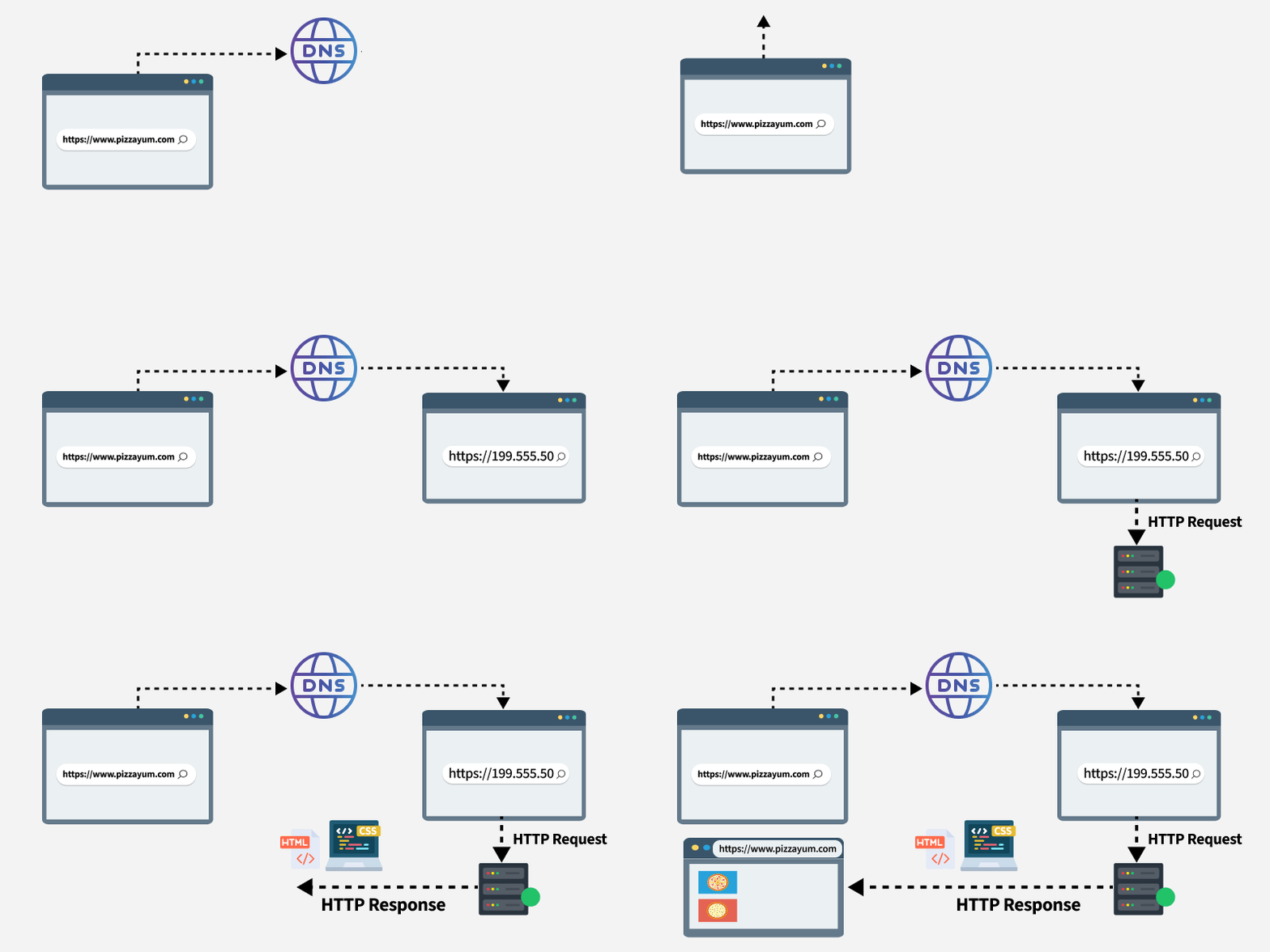
Step-by-step breakdown:
- Browser parses the URL → Protocol (
https), domain (google.com), path (/search) - DNS Lookup → Resolves
google.comto an IP address like142.250.183.14 - TCP Connection → Three-way handshake (SYN → SYN-ACK → ACK)
- TLS Handshake → If HTTPS, negotiate encryption (Client Hello → Server Hello → Key Exchange)
- HTTP Request → Browser sends
GET /search?q=hello HTTP/2 - Server Processing → Server receives request, queries database, builds response
- HTTP Response → Server returns
200 OKwith HTML content - Rendering → Browser parses HTML, fetches CSS/JS, paints the page
1.2 HTTP / HTTPS
HTTP (HyperText Transfer Protocol) is the foundation of data communication on the web.
| Feature | HTTP | HTTPS |
|---|---|---|
| Port | 80 | 443 |
| Encryption | None | TLS/SSL |
| Speed | Slightly faster | Slightly slower (handshake overhead) |
| Security | Vulnerable to MITM | Encrypted end-to-end |
| SEO | Not preferred | Google ranking boost |
| Use case | Internal APIs | Everything public-facing |
HTTP Methods:
| Method | Purpose | Idempotent | Safe |
|---|---|---|---|
GET |
Retrieve data | ✅ | ✅ |
POST |
Create resource | ❌ | ❌ |
PUT |
Replace resource | ✅ | ❌ |
PATCH |
Partial update | ❌ | ❌ |
DELETE |
Remove resource | ✅ | ❌ |
HTTP Status Codes:
| Range | Category | Common Codes |
|---|---|---|
1xx |
Informational | 100 Continue, 101 Switching Protocols |
2xx |
Success | 200 OK, 201 Created, 204 No Content |
3xx |
Redirection | 301 Moved Permanently, 302 Found, 304 Not Modified |
4xx |
Client Error | 400 Bad Request, 401 Unauthorized, 403 Forbidden, 404 Not Found, 429 Too Many Requests |
5xx |
Server Error | 500 Internal Server Error, 502 Bad Gateway, 503 Service Unavailable |
1.3 TCP vs UDP
| Feature | TCP | UDP |
|---|---|---|
| Connection | Connection-oriented (3-way handshake) | Connectionless |
| Reliability | Guaranteed delivery, ordering, retransmission | No guarantees |
| Speed | Slower (overhead) | Faster (minimal overhead) |
| Header Size | 20-60 bytes | 8 bytes |
| Flow Control | Yes (sliding window) | No |
| Use Cases | HTTP, FTP, SSH, Email | DNS, Video streaming, Gaming, VoIP |
TCP Three-Way Handshake:
1.4 DNS (Domain Name System)
DNS is the "phonebook of the internet" — it translates human-readable domain names to IP addresses.
DNS Resolution Process:
DNS Record Types:
| Record | Purpose | Example |
|---|---|---|
| A | Domain → IPv4 | example.com → 93.184.216.34 |
| AAAA | Domain → IPv6 | example.com → 2606:2800:220:1:: |
| CNAME | Domain → Domain | www.example.com → example.com |
| MX | Mail server | example.com → mail.example.com |
| NS | Nameserver | example.com → ns1.example.com |
| TXT | Text records | SPF, DKIM verification |
1.5 REST APIs
REST (Representational State Transfer) is an architectural style for designing networked applications.
REST Principles:
- Client-Server — Separation of concerns
- Stateless — Each request contains all needed information
- Cacheable — Responses can be cached
- Uniform Interface — Consistent URL structure
- Layered System — Client doesn't know if it's talking to end server or intermediary
Example REST API:
GET    /api/users          → List all users
GET    /api/users/123      → Get user 123
POST   /api/users          → Create a new user
PUT    /api/users/123      → Replace user 123
PATCH  /api/users/123      → Update user 123 partially
DELETE /api/users/123      → Delete user 123
1.6 WebSockets
WebSockets provide full-duplex, persistent connections between client and server.
| Feature | HTTP Polling | Long Polling | SSE | WebSocket |
|---|---|---|---|---|
| Direction | Client → Server | Client → Server | Server → Client | Bidirectional |
| Connection | New each time | Held open | Persistent | Persistent |
| Overhead | High | Medium | Low | Very Low |
| Use Case | Simple updates | Notifications | Live feeds | Chat, Gaming |
Real-world uses: Chat apps (Slack, Discord), live sports scores, stock tickers, multiplayer games.
1.7 Latency vs Bandwidth
| Concept | Definition | Analogy |
|---|---|---|
| Latency | Time for data to travel from A to B | How long it takes a car to reach the destination |
| Bandwidth | Maximum data transferred per unit time | How many lanes the highway has |
| Throughput | Actual data transferred per unit time | How many cars actually pass through |
Latency Numbers Every Programmer Should Know:
| Operation | Time |
|---|---|
| L1 cache reference | 0.5 ns |
| L2 cache reference | 7 ns |
| Main memory reference | 100 ns |
| SSD random read | 150 µs |
| HDD random read | 10 ms |
| Send packet CA → Netherlands → CA | 150 ms |
| Read 1 MB from SSD | 1 ms |
| Read 1 MB from HDD | 20 ms |
| Read 1 MB from network | 10 ms |
2. Client-Server Architecture
The client-server model is the backbone of virtually every web application.
2.1 How It Works
- Client: Makes requests (browser, mobile app, another server)
- Server: Processes requests, runs business logic, returns responses
- API: The contract between client and server
2.2 Stateless vs Stateful Servers
| Aspect | Stateless | Stateful |
|---|---|---|
| State Storage | No state between requests | Server remembers previous requests |
| Scaling | Easy — any server can handle any request | Hard — must route to the same server |
| Examples | REST APIs, Microservices | WebSocket servers, Gaming servers |
| Session Handling | External store (Redis, JWT) | In-memory on server |
| Failure Recovery | Easy — just spin up new server | Hard — state is lost |
Best Practice: Design stateless servers and externalize state (Redis, database).
2.3 Vertical vs Horizontal Scaling
)
| Aspect | Vertical Scaling (Scale Up) | Horizontal Scaling (Scale Out) |
|---|---|---|
| How | Add more CPU/RAM/Disk to one machine | Add more machines |
| Cost | Expensive (diminishing returns) | Cheaper (commodity hardware) |
| Limit | Hardware ceiling | Virtually unlimited |
| Downtime | Usually requires restart | No downtime (add nodes) |
| Complexity | Simple | Complex (distributed systems) |
| Example | Upgrade from 8GB → 64GB RAM | Add 10 more servers behind a load balancer |
In practice: Start with vertical scaling, then move to horizontal when you hit limits.
2.4 Monolith vs Microservices
| Aspect | Monolith | Microservices |
|---|---|---|
| Structure | Single deployable unit | Many small, independent services |
| Deployment | Deploy everything together | Deploy services independently |
| Scaling | Scale entire app | Scale individual services |
| Technology | Single tech stack | Polyglot (different languages per service) |
| Team Size | Small teams | Large organizations |
| Debugging | Easier (single codebase) | Harder (distributed tracing needed) |
| Latency | Lower (in-process calls) | Higher (network calls between services) |
When to use what:
- Monolith: Startups, MVPs, small teams, simple domains
- Microservices: Large orgs, complex domains, need for independent deployments
3. Databases 🗄️
Databases are the heart of any system. Choosing the right database is one of the most critical design decisions.
3.1 SQL Databases (Relational)
SQL databases store data in tables with rows and columns and enforce relationships via foreign keys.
Popular SQL Databases:
| Database | Best For |
|---|---|
| PostgreSQL | Complex queries, JSONB support, extensibility |
| MySQL | Web applications, read-heavy workloads |
| SQLite | Embedded apps, mobile, prototyping |
| SQL Server | Enterprise, .NET ecosystem |
ACID Properties:
| Property | Meaning | Example |
|---|---|---|
| Atomicity | All or nothing — transaction fully completes or fully rolls back | Bank transfer: debit AND credit both succeed or both fail |
| Consistency | Data moves from one valid state to another | Account balance never goes negative |
| Isolation | Concurrent transactions don't interfere | Two users buying the last item — only one succeeds |
| Durability | Committed data survives crashes | After "Transfer successful", data persists even if server crashes |
Indexes:
Indexes speed up reads dramatically but slow down writes.
-- Without index: Full table scan O(n)
SELECT * FROM users WHERE email = 'john@example.com';

-- With index: B-tree lookup O(log n)
CREATE INDEX idx_users_email ON users(email);
SELECT * FROM users WHERE email = 'john@example.com';  -- 100x faster
When Index Helps:
| Scenario | Without Index | With Index |
|---|---|---|
| Find user by email | ~500ms (10M rows) | ~2ms |
| Sort by created_at | ~2s | ~50ms |
| JOIN on foreign key | ~3s | ~100ms |
3.2 NoSQL Databases
NoSQL databases are designed for specific data models and have flexible schemas.
Types of NoSQL Databases:
| Type | Database | Data Model | Best For |
|---|---|---|---|
| Document | MongoDB, CouchDB | JSON-like documents | Flexible schemas, content management |
| Key-Value | Redis, DynamoDB | Key → Value pairs | Caching, sessions, real-time data |
| Column-Family | Cassandra, HBase | Column families | Time-series, IoT, write-heavy |
| Graph | Neo4j, Amazon Neptune | Nodes + Edges | Social networks, recommendations |
3.3 SQL vs NoSQL — When to Use What?
| Factor | SQL | NoSQL |
|---|---|---|
| Schema | Fixed, predefined | Flexible, dynamic |
| Relationships | Strong (JOINs, foreign keys) | Weak (denormalized) |
| Scaling | Vertical (hard to shard) | Horizontal (built for it) |
| Consistency | Strong (ACID) | Eventual (BASE) |
| Query Language | SQL (standardized) | Varies per database |
| Transactions | Full support | Limited support |
| Best For | Banking, e-commerce, ERP | Social media, IoT, real-time analytics |
Decision Framework:
Need ACID transactions?          → SQL (PostgreSQL, MySQL)
Flexible/changing schema?        → NoSQL (MongoDB)
Ultra-fast key lookups?          → Key-Value (Redis, DynamoDB)
Massive write throughput?        → Column (Cassandra)
Complex relationships?           → Graph (Neo4j) or SQL
Time-series data?                → InfluxDB, TimescaleDB
4. Database Scaling
As your application grows, a single database becomes a bottleneck. Database scaling strategies are critical.
4.1 Replication
Replication creates copies of your database across multiple servers.
Primary-Replica Architecture:
| Aspect | Single DB | Primary-Replica |
|---|---|---|
| Read throughput | Limited | Multiplied by replica count |
| Write throughput | Limited | Same (single primary) |
| Availability | Single point of failure | Failover to replica |
| Data consistency | Perfect | Slight replication lag |
4.2 Sharding (Horizontal Partitioning)
Sharding splits data across multiple databases based on a shard key.
Example: Sharding users by user_id
Shard Key: user_id % 3

User ID 1  → Shard 0
User ID 2  → Shard 1
User ID 3  → Shard 2
User ID 4  → Shard 0  (4 % 3 = 1... wraps around)
User ID 5  → Shard 1
User ID 6  → Shard 2
Sharding Strategies:
| Strategy | How It Works | Pros | Cons |
|---|---|---|---|
| Hash-based | hash(key) % N |
Even distribution | Hard to add shards |
| Range-based | A-M → Shard 1, N-Z → Shard 2 |
Easy range queries | Hotspots possible |
| Geographic | Region-based | Data locality | Uneven distribution |
| Directory-based | Lookup table maps key → shard | Flexible | Lookup table is SPOF |
Challenges of Sharding:
- Cross-shard queries are expensive
- Rebalancing when adding new shards
- JOINs across shards are nearly impossible
- Referential integrity can't be enforced across shards
4.3 CAP Theorem
The CAP theorem states that a distributed system can guarantee only two out of three properties simultaneously.
| Property | Meaning |
|---|---|
| Consistency (C) | Every read receives the most recent write |
| Availability (A) | Every request receives a response (even if not the latest) |
| Partition Tolerance (P) | System continues to operate despite network partitions |
In practice, network partitions are inevitable, so you're really choosing between:
| Choice | Behavior During Partition | Example Systems |
|---|---|---|
| CP | Rejects requests to maintain consistency | MongoDB, HBase, Redis Cluster |
| AP | Serves potentially stale data to remain available | Cassandra, DynamoDB, CouchDB |
4.4 Consistency Models
| Model | Description | Use Case |
|---|---|---|
| Strong Consistency | Read always returns latest write | Banking, financial transactions |
| Eventual Consistency | Read may return stale data, but will converge | Social media feeds, DNS |
| Causal Consistency | Operations causally related are seen in order | Messaging apps |
| Read-Your-Writes | User always sees their own writes | User profile updates |
5. Caching ⚡
Caching stores frequently accessed data in fast storage (memory) to reduce latency and database load.
)
"There are only two hard things in Computer Science: cache invalidation and naming things." — Phil Karlton
5.1 Why Caching Matters
| Metric | Without Cache | With Cache |
|---|---|---|
| Avg response time | 200ms | 5ms |
| Database queries/sec | 10,000 | 1,000 (90% cache hit) |
| Server costs | High | Reduced 60-80% |
5.2 Caching Strategies
| Strategy | How It Works | Pros | Cons |
|---|---|---|---|
| Cache-Aside | App checks cache first → miss → read DB → write cache | Simple, cache only what's needed | Cache miss penalty, possible stale data |
| Read-Through | Cache sits between app and DB, auto-fetches on miss | App logic simpler | Cache library coupling |
| Write-Through | Data written to cache AND DB simultaneously | Strong consistency | Higher write latency |
| Write-Behind | Data written to cache first, async write to DB | Low write latency | Risk of data loss |
| Write-Around | Data written directly to DB, cache only on read | Avoids cache pollution | Higher read miss rate |
Cache-Aside Pattern (Most Common):
5.3 Redis
Redis (Remote Dictionary Server) is the most popular in-memory data store used for caching.
Redis Data Structures:
Strings:   SET user:123 "John"            → Simple key-value
Hashes:    HSET user:123 name "John"      → Object-like storage
Lists:     LPUSH notifications "msg1"     → Queues, feeds
Sets:      SADD tags "python" "redis"     → Unique collections
Sorted Sets: ZADD leaderboard 100 "player1" → Rankings, priority queues
Redis Example — Cache-Aside in Node.js:
async function getUser(userId) {
  // 1. Check cache
  const cached = await redis.get(`user:${userId}`);
  if (cached) return JSON.parse(cached); // Cache HIT

  // 2. Cache MISS — query database
  const user = await db.query("SELECT * FROM users WHERE id = $1", [userId]);

  // 3. Store in cache with 1 hour TTL
  await redis.setex(`user:${userId}`, 3600, JSON.stringify(user));

  return user;
}
5.4 Cache Eviction Policies
When the cache is full, which items do we remove?
| Policy | How It Works | Best For |
|---|---|---|
| LRU (Least Recently Used) | Remove item not accessed for longest | General purpose (most common) |
| LFU (Least Frequently Used) | Remove item accessed fewest times | Data with varying popularity |
| FIFO (First In, First Out) | Remove oldest item | Simple use cases |
| TTL (Time To Live) | Remove item after set time | Sessions, temp data |
| Random | Remove random item | When all items equally valuable |
5.5 Cache Problems
| Problem | Description | Solution |
|---|---|---|
| Cache Stampede | Many requests hit DB simultaneously on cache miss | Locking, request coalescing |
| Cache Penetration | Requests for non-existent data bypass cache | Bloom filter, cache null values |
| Cache Avalanche | Many cache entries expire at the same time | Stagger TTLs, add jitter |
| Stale Data | Cache serves outdated data | Shorter TTL, event-driven invalidation |
6. Load Balancers
A load balancer distributes incoming traffic across multiple servers to ensure no single server is overwhelmed.
6.1 Why Load Balancers?
(Overloaded / SPOF ❌)"] end subgraph With_LB["With Load Balancer"] direction TB Users2["Users"] --> LB["Load Balancer"] LB --> S1["Server 1 (30%)"] LB --> S2["Server 2 (35%)"] LB --> S3["Server 3 (35%)"] end
Benefits:
- High Availability — If one server dies, traffic reroutes to healthy servers
- Scalability — Add/remove servers without downtime
- Performance — Distribute load evenly
- SSL Termination — Offload HTTPS encryption from app servers
6.2 Layer 4 vs Layer 7 Load Balancing
| Feature | Layer 4 (Transport) | Layer 7 (Application) |
|---|---|---|
| Operates on | TCP/UDP packets | HTTP requests |
| Routing decisions | IP address, port | URL, headers, cookies, body |
| Speed | Faster (less processing) | Slower (inspects content) |
| SSL | Passes through | Can terminate SSL |
| Use Cases | Simple TCP balancing | URL-based routing, A/B testing |
| Example | Gaming servers | API routing (/api/users → User Service) |
6.3 Load Balancing Algorithms
| Algorithm | How It Works | Best For |
|---|---|---|
| Round Robin | Requests distributed sequentially: 1→2→3→1→2→3 | Servers with equal capacity |
| Weighted Round Robin | Higher-capacity servers get more requests | Mixed hardware |
| Least Connections | Route to server with fewest active connections | Long-lived connections |
| Least Response Time | Route to fastest-responding server | Latency-sensitive apps |
| IP Hash | Hash client IP to determine server | Session persistence |
| Random | Random server selection | Simple, stateless |
6.4 Health Checks
Load balancers continuously check server health:
Health check types:
- Active: LB periodically pings servers
- Passive: LB monitors response errors from real traffic
6.5 Reverse Proxy vs Load Balancer
| Feature | Reverse Proxy | Load Balancer |
|---|---|---|
| Primary Purpose | Security, caching, SSL | Distribute traffic |
| Servers | Can work with 1 server | Requires 2+ servers |
| Caching | Yes | Usually no |
| Compression | Yes | Usually no |
| Examples | Nginx, Apache | HAProxy, AWS ALB/NLB |
Note: Nginx can function as both a reverse proxy and a load balancer.
7. Message Queues & Event-Driven Systems
Message queues enable asynchronous communication between services, decoupling producers from consumers.
7.1 Why Message Queues?
Without a queue (synchronous) vs With a queue (asynchronous):
7.2 Core Concepts
| Concept | Description |
|---|---|
| Producer | Sends messages to the queue |
| Consumer | Reads and processes messages from the queue |
| Queue/Topic | Channel where messages are stored |
| Broker | Server that manages queues (Kafka, RabbitMQ) |
| Partition | Subdivision of a topic for parallelism |
| Consumer Group | Group of consumers sharing message processing |
| Offset | Position marker of a consumer in a partition |
7.3 Apache Kafka
Kafka is a distributed event streaming platform designed for high-throughput, fault-tolerant messaging.
Kafka Architecture:
msg1, msg3"] Part1["Part. 1
msg2, msg4"] end end Part0 --> C1["Consumer 1 (Group A)"] Part1 --> C2["Consumer 2 (Group A)"] Part0 --> C3["Consumer 3 (Group B)"] Part1 --> C3
Why Kafka?
| Feature | Value |
|---|---|
| Throughput | Millions of messages/sec |
| Durability | Messages persisted to disk |
| Scalability | Add partitions/brokers |
| Replay | Consumers can re-read messages |
| Ordering | Guaranteed within a partition |
7.4 Pub/Sub vs Point-to-Point
| Pattern | How It Works | Use Case |
|---|---|---|
| Point-to-Point | One producer → one consumer | Task queues, work distribution |
| Pub/Sub | One producer → many consumers | Event broadcasting, notifications |
7.5 Dead Letter Queues (DLQ)
When a message fails processing after max retries, it goes to a Dead Letter Queue for investigation.
8. Distributed Systems
A distributed system is a collection of independent computers that appear to the user as a single coherent system.
8.1 Why Distributed Systems?
| Reason | Explanation |
|---|---|
| Scalability | Handle more load by adding machines |
| Fault Tolerance | System survives individual machine failures |
| Low Latency | Serve users from geographically nearby servers |
| Data Volume | Store more data than one machine can hold |
8.2 Challenges (Fallacies of Distributed Computing)
Peter Deutsch's 8 Fallacies — things developers wrongly assume:
- The network is reliable
- Latency is zero
- Bandwidth is infinite
- The network is secure
- Topology doesn't change
- There is one administrator
- Transport cost is zero
- The network is homogeneous
8.3 Consensus Algorithms
How do multiple nodes agree on a value?
| Algorithm | Used By | Characteristics |
|---|---|---|
| Paxos | Google Chubby | Proven correct, complex to implement |
| Raft | etcd, Consul | Easier to understand, leader-based |
| ZAB | Apache Zookeeper | Similar to Paxos, used for coordination |
Raft — Leader Election:
8.4 Distributed Locks
When multiple services need exclusive access to a resource:
Redis-based Distributed Lock (Redlock):
1. Client tries to SET lock_key "unique_value" NX EX 30
   NX = only if not exists
   EX = expires in 30 seconds

2. If SET succeeds → lock acquired ✅
3. Do work...
4. Release: DELETE lock_key (only if value matches)
8.5 Idempotency
An operation is idempotent if performing it multiple times has the same effect as performing it once.
| Operation | Idempotent? | Why |
|---|---|---|
GET /users/123 |
✅ | Reading doesn't change state |
PUT /users/123 |
✅ | Replaces entire resource |
DELETE /users/123 |
✅ | Deleting twice = same result |
POST /users |
❌ | Creates new resource each time |
Why it matters: In distributed systems, requests can be retried due to network failures. Idempotent operations are safe to retry.
9. Storage
Understanding storage types is crucial for designing systems that handle large amounts of data.
9.1 Storage Types
| Type | Description | Examples | Use Case |
|---|---|---|---|
| Block Storage | Raw blocks of data, like a physical hard drive | AWS EBS, Azure Disk | Databases, VMs |
| File Storage | Hierarchical file system (folders/files) | AWS EFS, NFS | Shared file systems |
| Object Storage | Flat structure, each object has key + data + metadata | AWS S3, Google Cloud Storage | Images, videos, backups |
9.2 Object Storage (S3)
Amazon S3 is the gold standard for object storage.
S3 Key Concepts:
Bucket: my-app-images
  ├── users/avatar/123.jpg     (Object)
  ├── users/avatar/456.jpg     (Object)
  ├── posts/images/789.png     (Object)
  └── backups/db-2024-01.sql   (Object)

Each object has:
  - Key:      users/avatar/123.jpg
  - Value:    Binary data (the file)
  - Metadata: Content-Type, size, custom headers
S3 Storage Classes:
| Class | Availability | Cost | Use Case |
|---|---|---|---|
| Standard | 99.99% | $$$ | Frequently accessed |
| Infrequent Access | 99.9% | $$ | Accessed monthly |
| Glacier | 99.99% | $ | Archives, compliance |
| Glacier Deep Archive | 99.99% | ¢ | Long-term archives |
9.3 When to Use What?
Structured data + queries?     → Database (PostgreSQL, MongoDB)
User-uploaded files?           → Object Storage (S3)
Shared file system?            → File Storage (EFS, NFS)
VM/Database disk?              → Block Storage (EBS)
Static website assets?         → Object Storage + CDN
Large media files?             → Object Storage with CDN
10. CDN (Content Delivery Network) 🌍
A CDN is a geographically distributed network of servers that delivers content to users from the nearest edge location, reducing latency.
10.1 How CDN Works
10.2 Push vs Pull CDN
| Type | How It Works | Pros | Cons |
|---|---|---|---|
| Pull CDN | CDN fetches content from origin on first request | Simple setup, auto-updates | First request is slow |
| Push CDN | You upload content directly to CDN | Full control, instant availability | Manual management |
10.3 CDN Use Cases
| Content Type | Without CDN | With CDN |
|---|---|---|
| Images | 800ms (cross-continent) | 50ms (nearby edge) |
| CSS/JS bundles | 500ms | 30ms |
| Video streaming | Buffering, poor quality | Smooth playback |
| API responses | Not typically cached | Cache GET responses |
Popular CDNs: Cloudflare, AWS CloudFront, Akamai, Fastly, Google Cloud CDN
10.4 Cache Invalidation in CDN
How to update content when it changes:
| Method | How | Delay |
|---|---|---|
| TTL Expiry | Content expires after set time | Automatic but delayed |
| Purge | Manually remove content from all edges | Immediate |
| Versioning | Change URL: style.v2.css or style.css?v=2 |
Immediate |
| Stale-While-Revalidate | Serve stale, fetch fresh in background | Near-instant |
11. Microservices
Microservices architecture structures an application as a collection of small, autonomous services that are independently deployable.
11.1 API Gateway
An API Gateway is the single entry point for all client requests in a microservices architecture.
─────────────
• Authentication
• Rate Limiting
• Request Routing
• Response Aggregation
• SSL Termination
• Logging"] end APIGW --> UserSvc["User Service"] APIGW --> OrderSvc["Order Service"] APIGW --> PaymentSvc["Payment Service"] APIGW --> NotifSvc["Notification Service"]
11.2 Service Communication
| Pattern | How | When |
|---|---|---|
| Synchronous (HTTP/gRPC) | Service A calls Service B and waits | Need immediate response |
| Asynchronous (Message Queue) | Service A publishes event, Service B consumes | Fire-and-forget, eventual consistency |
| Event-Driven | Services react to events | Decoupled, scalable |
Synchronous vs Asynchronous Communication:
11.3 Service Discovery
How do services find each other?
| Type | How It Works | Example |
|---|---|---|
| Client-side | Client queries registry, picks instance | Netflix Eureka |
| Server-side | Load balancer queries registry, routes | AWS ALB, Kubernetes |
| DNS-based | Service name resolves to IPs | Consul DNS |
11.4 Circuit Breaker Pattern
Prevents cascading failures when a downstream service is failing.
Three States:
| State | Behavior |
|---|---|
| Closed | Normal operation, requests pass through |
| Open | All requests fail immediately (fast fail) |
| Half-Open | Allow limited requests to test if service recovered |
11.5 Saga Pattern (Distributed Transactions)
Since microservices can't use traditional database transactions across services, use the Saga pattern:
Example: E-commerce Order
12. Reliability & Fault Tolerance
Building systems that continue operating correctly even when components fail.
12.1 Key Concepts
| Concept | Definition | Example |
|---|---|---|
| Reliability | System performs correctly under stated conditions | 99.9% of requests succeed |
| Availability | System is operational and accessible | Uptime percentage |
| Fault Tolerance | System continues operating despite failures | Survive server crash |
| Resilience | System recovers quickly from failures | Auto-healing clusters |
Availability SLAs (The "Nines"):
| Availability | Downtime/Year | Downtime/Month | Downtime/Day |
|---|---|---|---|
| 99% | 3.65 days | 7.31 hours | 14.4 min |
| 99.9% | 8.77 hours | 43.8 min | 1.44 min |
| 99.99% | 52.6 min | 4.38 min | 8.6 sec |
| 99.999% | 5.26 min | 26.3 sec | 864 ms |
12.2 Redundancy & Failover
| Pattern | How | Pros | Cons |
|---|---|---|---|
| Active-Passive | Standby takes over on failure | Simple, no conflict | Standby wastes resources |
| Active-Active | Both handle traffic | Better utilization | Data sync complexity |
12.3 Retry Strategies
| Strategy | Behavior | Use Case |
|---|---|---|
| Immediate Retry | Retry right away | Transient network glitch |
| Fixed Delay | Wait N seconds between retries | API rate limits |
| Exponential Backoff | Wait 1s, 2s, 4s, 8s... | Overloaded downstream |
| Exponential + Jitter | Backoff + random delay | Prevent thundering herd |
Exponential Backoff with Jitter:
Attempt 1: wait 1s + random(0, 0.5s)
Attempt 2: wait 2s + random(0, 1.0s)
Attempt 3: wait 4s + random(0, 2.0s)
Attempt 4: wait 8s + random(0, 4.0s)
Max retries: 5 → give up, alert
12.4 Rate Limiting
Controls how many requests a client can make in a time window.
Common Algorithms:
| Algorithm | How It Works | Pros | Cons |
|---|---|---|---|
| Token Bucket | Tokens added at fixed rate; each request uses a token | Allows bursts | Complex to implement |
| Leaky Bucket | Requests processed at fixed rate; excess queued/dropped | Smooth output | No burst handling |
| Fixed Window | Count requests in fixed time windows | Simple | Boundary burst problem |
| Sliding Window | Rolling window for counting | Accurate | More memory |
12.5 Graceful Degradation
When part of the system fails, reduce functionality instead of complete failure:
Full Service:
  - Real-time recommendations (ML model)
  - Live search suggestions
  - Dynamic pricing

Degraded Service (ML model down):
  - Static popular recommendations ← fallback
  - Basic search (no suggestions)
  - Standard pricing ← fallback
13. Security 🔐
Security is a non-negotiable aspect of system design.
13.1 Authentication vs Authorization
| Concept | Question It Answers | Example |
|---|---|---|
| Authentication (AuthN) | Who are you? | Login with username/password |
| Authorization (AuthZ) | What can you do? | Admin can delete; user can only read |
13.2 OAuth 2.0
OAuth 2.0 is the industry standard for authorization. It lets apps access user data without exposing passwords.
Authorization Code Flow (Most Common):
OAuth Roles:
| Role | Description | Example |
|---|---|---|
| Resource Owner | The user who owns the data | You |
| Client | App requesting access | Third-party app |
| Authorization Server | Issues tokens | Google Auth |
| Resource Server | Hosts protected resources | Google Photos API |
13.3 JWT (JSON Web Tokens)
JWTs are self-contained tokens used for stateless authentication.
JWT Structure:
eyJhbGciOiJIUzI1NiIsInR5cCI6IkpXVCJ9.     ← Header (base64)
eyJzdWIiOiIxMjM0NTY3ODkwIiwibmFtZSI6Ikp.   ← Payload (base64)
SflKxwRJSMeKKF2QT4fwpMeJf36POk6yJV_adQ.    ← Signature

Header:  { "alg": "HS256", "typ": "JWT" }
Payload: { "sub": "1234567890", "name": "John", "role": "admin", "exp": 1700000000 }
Signature: HMACSHA256(base64(header) + "." + base64(payload), secret)
JWT vs Session:
| Feature | JWT | Session |
|---|---|---|
| Storage | Client-side (cookie/localStorage) | Server-side (memory/Redis) |
| Scalability | Excellent (stateless) | Requires shared session store |
| Revocation | Hard (must wait for expiry) | Easy (delete from store) |
| Size | Larger (contains claims) | Small (just session ID) |
| Security | Can be decoded (not encrypted) | Server-controlled |
13.4 HTTPS & TLS
TLS (Transport Layer Security) encrypts communication between client and server.
TLS Handshake:
13.5 Common Security Threats
| Threat | Description | Prevention |
|---|---|---|
| SQL Injection | Malicious SQL in user input | Parameterized queries, ORM |
| XSS | Injecting scripts into web pages | Input sanitization, CSP headers |
| CSRF | Forging requests from authenticated user | CSRF tokens, SameSite cookies |
| DDoS | Overwhelming server with traffic | Rate limiting, CDN, WAF |
| MITM | Intercepting communication | HTTPS/TLS, certificate pinning |
| Brute Force | Trying many passwords | Rate limiting, account lockout, CAPTCHA |
Password Security:
❌ Never store plain text: "password123"
❌ Never use MD5/SHA1:     "482c811da5d5b4bc..."
✅ Use bcrypt/scrypt:      "$2b$12$LJ3m4ys..." (salted + slow hash)
13.6 API Security Checklist
- ✅ Use HTTPS everywhere
- ✅ Authenticate with OAuth 2.0 / JWT
- ✅ Implement rate limiting
- ✅ Validate and sanitize all inputs
- ✅ Use parameterized database queries
- ✅ Set proper CORS headers
- ✅ Don't expose sensitive data in URLs
- ✅ Log security events
- ✅ Keep dependencies updated
- ✅ Use API keys for server-to-server communication
14. Observability 🔍
Observability is the ability to understand the internal state of a system by examining its outputs.
14.1 Three Pillars of Observability
| Pillar | What It Captures | Tool Examples |
|---|---|---|
| Logs | Discrete events with context | ELK Stack, Loki, Splunk |
| Metrics | Numerical measurements over time | Prometheus, Datadog, CloudWatch |
| Traces | Request journey across services | Jaeger, Zipkin, OpenTelemetry |
14.2 Logging
Log Levels:
| Level | When to Use | Example |
|---|---|---|
DEBUG |
Detailed debugging info | DEBUG: SQL query: SELECT * FROM users WHERE id=123 |
INFO |
General information | INFO: User 123 logged in successfully |
WARN |
Potential issues | WARN: API response took 5s (threshold: 2s) |
ERROR |
Error occurred but app continues | ERROR: Payment failed for order #456 |
FATAL |
Critical failure, app may crash | FATAL: Database connection pool exhausted |
Structured Logging (Best Practice):
{
  "timestamp": "2024-01-15T10:30:00Z",
  "level": "ERROR",
  "service": "payment-service",
  "trace_id": "abc-123-def",
  "user_id": "user_456",
  "message": "Payment processing failed",
  "error": "InsufficientFunds",
  "amount": 99.99,
  "currency": "USD"
}
14.3 Metrics
Key Metrics to Monitor:
| Category | Metric | What It Tells You |
|---|---|---|
| Latency | p50, p95, p99 response time | How fast your system responds |
| Traffic | Requests per second (RPS) | How much load you're handling |
| Errors | Error rate (5xx/total) | How reliable your system is |
| Saturation | CPU, memory, disk usage | How close to capacity |
These are known as the Four Golden Signals (from Google's SRE book).
Prometheus Query Examples:
# Request rate (last 5 min)
rate(http_requests_total[5m])

# 99th percentile latency
histogram_quantile(0.99, rate(http_request_duration_seconds_bucket[5m]))

# Error rate
rate(http_requests_total{status=~"5.."}[5m]) / rate(http_requests_total[5m])

# CPU usage
100 - (avg(rate(node_cpu_seconds_total{mode="idle"}[5m])) * 100)
14.4 Distributed Tracing
In microservices, a single user request can span multiple services. Tracing shows the complete journey.
Example Trace:
Each span contains:
- Trace ID (groups all spans)
- Span ID (unique to this operation)
- Parent Span ID
- Start time, duration
- Tags and logs
14.5 Monitoring & Alerting Stack
Typical Production Stack:
(emit logs, metrics, traces)"] Logs["Logs
(Loki / ELK)"] Metrics["Metrics
(Prometheus)"] Traces["Traces
(Jaeger / Zipkin)"] Apps --> Logs Apps --> Metrics Apps --> Traces Logs --> Grafana["Grafana Dashboard"] Metrics --> Grafana Traces --> Grafana Grafana --> Alerting["Alerting"] Alerting --> Notify["PagerDuty / Slack / Email"]
Tools Worth Knowing:
| Tool | Category | Purpose |
|---|---|---|
| Prometheus | Metrics | Time-series metrics collection |
| Grafana | Visualization | Dashboards for metrics, logs, traces |
| ELK Stack | Logging | Elasticsearch + Logstash + Kibana |
| Jaeger | Tracing | Distributed tracing |
| OpenTelemetry | Standard | Vendor-neutral observability framework |
| PagerDuty | Alerting | On-call and incident management |
| Datadog | All-in-one | Metrics + Logs + Traces + APM |
14.6 Alerting Best Practices
| Practice | Description |
|---|---|
| Alert on symptoms, not causes | Alert on "high error rate" not "CPU spike" |
| Use severity levels | P1 (page immediately) vs P3 (review next day) |
| Avoid alert fatigue | Too many alerts = people ignore them |
| Include runbooks | Every alert should link to a troubleshooting guide |
| Set proper thresholds | Based on SLOs, not arbitrary numbers |
🧭 Quick Reference — System Design Building Blocks
| Component | Purpose | Examples |
|---|---|---|
| DNS | Domain → IP resolution | Route 53, Cloudflare DNS |
| CDN | Cache static content at edge | CloudFront, Cloudflare |
| Load Balancer | Distribute traffic | Nginx, HAProxy, AWS ALB |
| API Gateway | Single entry point, auth, routing | Kong, AWS API Gateway |
| Cache | Fast data access | Redis, Memcached |
| Database | Persistent data storage | PostgreSQL, MongoDB |
| Message Queue | Async communication | Kafka, RabbitMQ, SQS |
| Object Storage | Files, images, videos | S3, GCS |
| Search Engine | Full-text search | Elasticsearch, Algolia |
| Monitoring | Metrics, logs, traces | Prometheus, Grafana, Datadog |